

配置参考
MiniMax 同时提供两种兼容协议,你的工具支持哪种就选哪种——大多数现代工具至少支持其中一种。OpenAI 兼容协议
Anthropic 兼容协议
该选哪种协议
Dify
Dify 是一个开源 LLM 应用开发平台,集成工作流、RAG、Agent 与可观测性。
1
安装插件
打开 Dify Cloud,登录后进入 设置 → 工作空间 → 模型供应商,在列表中找到 Minimax 并点 安装。
2
配置 API Key
安装完成后点 添加 API Key,填入 订阅 Key、API Base
https://api.minimaxi.com/anthropic、Group ID 留空。3
开始使用
保存后即可在工作流中调用 MiniMax-M3 系列模型。
Cherry Studio
Cherry Studio 是一个开源桌面客户端,支持 50+ LLM 服务商,内置 MCP 服务器和 300+ 智能助手。
1
安装客户端
按 Cherry Studio 官方文档 完成安装。
2
添加 MiniMax provider
打开 Cherry Studio → 点 Choose other Providers → 搜索框输入
MiniMax,选 MiniMax CN。3
填入 API Key
填入 订阅 Key(API Host 已预填),点 Check 验证连接。
4
选模型
模型列表中选
MiniMax-M3 即可使用。Xcode
Xcode 是 Apple 官方 IDE,支持 macOS / iOS / iPadOS / watchOS / visionOS 开发,内置 Coding Intelligence。
1
安装 Xcode
从 Mac App Store 安装 Xcode 26 或更新版本。
2
添加 Model Provider
打开 Xcode → 顶部菜单 Xcode → Settings → Intelligence → Add a Model Provider,选 Internet Hosted 标签页,填: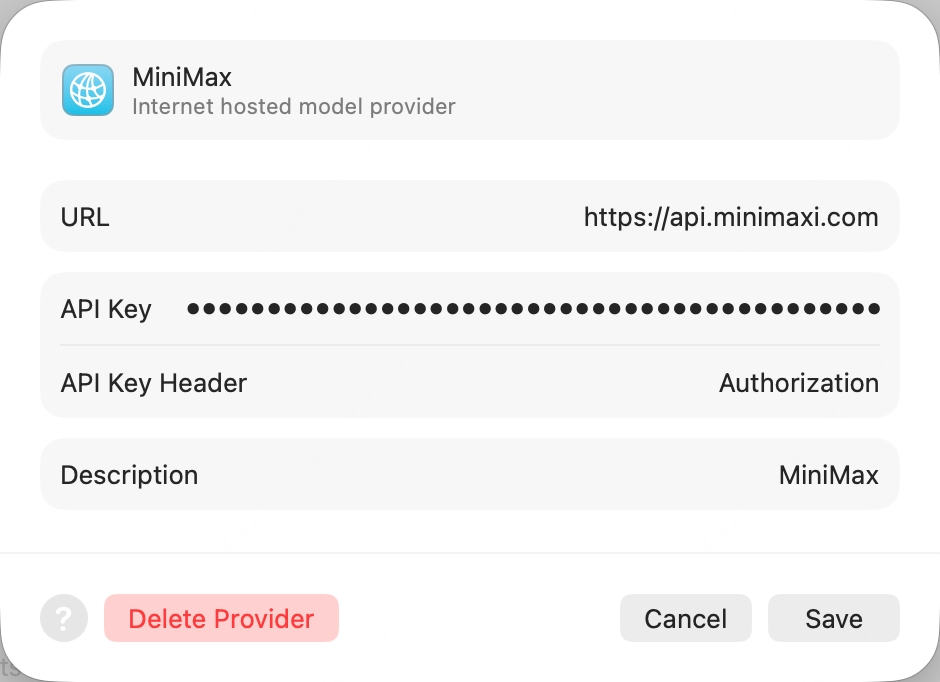
- URL:
https://api.minimaxi.com(裸 host,不带任何 path) - API Key Header:
Authorization(手动键入,覆盖默认的x-api-key) - API Key:
Bearer <你的订阅 Key>(Bearer后只有一个空格再接sk-cp-…key,去获取) - Description:
MiniMax(任意)
3
启用模型
点 Add,回 Intelligence 面板进入新加的 MiniMax provider,启用
MiniMax-M3。4
开始对话
打开任意项目,按 ⌘+0 唤出 Coding Assistant,左上角编辑图标里选
MiniMax-M3。Pi
Pi 是 earendil-works 出品的开源终端编程 Agent,通过统一 LLM API 接入任意服务商。
1
安装 Pi
2
设环境变量并启动
把 订阅 Key(前缀
sk-cp-…)设到环境变量后启动 Pi:Kilo Code
Kilo Code 是开源的 VS Code AI 编程 Agent 插件,支持多家 LLM 服务商和 MCP 服务器。
1
安装扩展
在 VS Code 扩展面板搜索
Kilo Code 安装。2
配置 MiniMax provider
打开 Kilo Code → Settings:
- API Provider 选
MiniMax - MiniMax Entrypoint 选
api.minimaxi.com - MiniMax API Key 填入 订阅 Key
- Model 选
MiniMax-M3
Zed
Zed 是 Atom 创始团队打造的开源高性能多人协同代码编辑器,由 Rust 编写。
1
安装 Zed
按 Zed 官方文档 完成安装。
2
添加 LLM Provider
设置 → LLM Provider → +Add Provider → 选 OpenAI,填:
- API URL:
https://api.minimaxi.com/v1 - API Key:Token Plan 获取
- Model Name:
MiniMax-M3
3
二次确认 API Key
点 Save Provider 保存,回 LLM Provider 列表点击新加的 MiniMax 条目,再次输入 API Key 并按回车确认。
4
选模型
回智能体面板右下角 Select a Model 选
MiniMax-M3 即可使用。OpenCode
OpenCode 是 SST 出品的开源终端 AI 编程 Agent,支持多服务商接入和 LSP 集成。
OpenCode 已内置 MiniMax-M3,无需额外配置文件。
1
安装 OpenCode
2
登录认证
运行
opencode auth login,提示选 provider 时搜并选 MiniMax Token Plan(minimaxi.com),填入 Token Plan API Key。3
启动
回到命令行
opencode 启动即可。Grok CLI
Grok CLI 是开源终端编程 Agent,可接入 xAI Grok 与任意 OpenAI 兼容服务商。
不推荐做 Agent 工作流,推荐使用 Claude Code 或 Cursor。
1
安装 Grok CLI
2
设环境变量并启动
Droid
Droid 是 Factory 官方终端编程 Agent,可与 IDE 和团队协作工具集成。
1
安装 Droid
2
编辑配置文件
在
~/.factory/config.json 加入:3
启动并选模型
启动
droid,/model 选 MiniMax-M3 即可使用。MonkeyCode
MonkeyCode 是长亭科技 (Chaitin) 出品的企业级 AI 开发平台,Code Agent 兼容 Codex / Claude Code / OpenCode。
MonkeyCode 内置免费的 MiniMax-M3,但资源池在高峰期可能排队,建议长期使用自己配 key。
1
登录平台
访问 MonkeyCode 官网 登录。
2
进入 AI 大模型配置
右下角 配置 → AI 大模型 → 绑定。
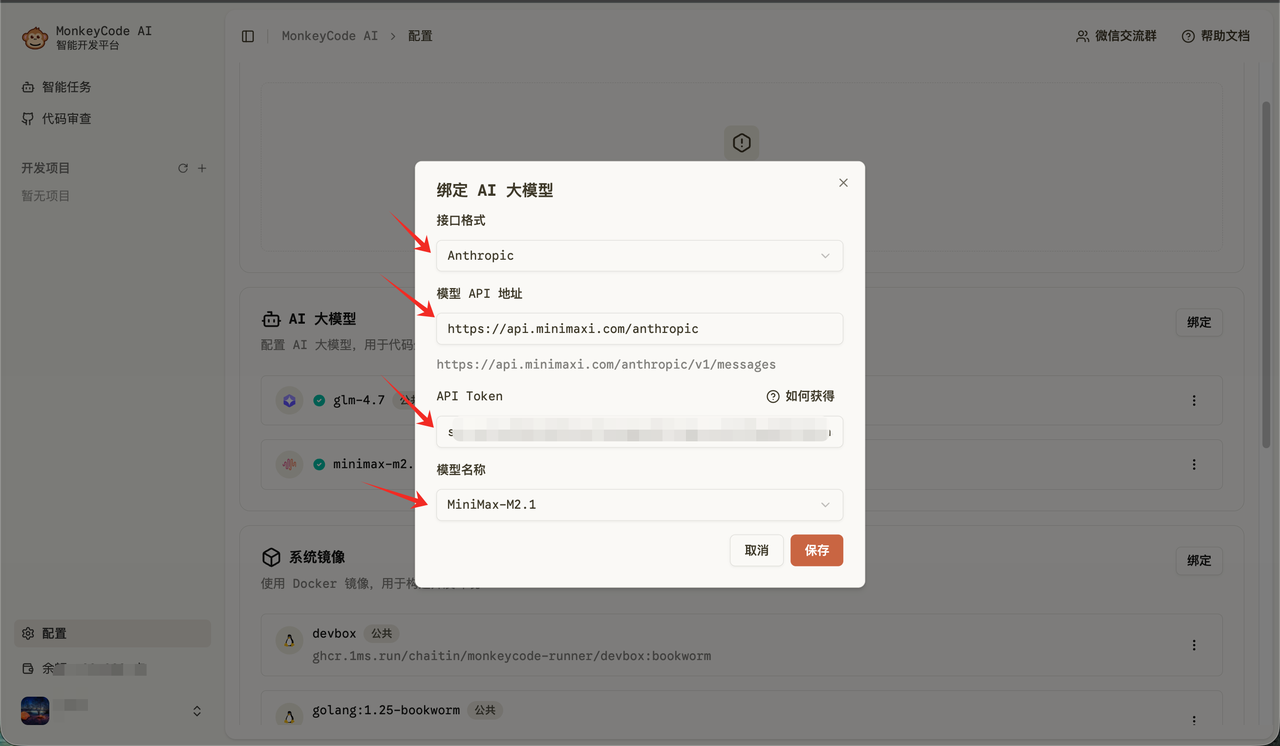
3
填入 MiniMax 配置
- API 地址:
https://api.minimaxi.com/anthropic - API Key:Token Plan 获取
- 接口格式:
anthropic - 模型名称:
MiniMax-M3
4
保存使用
保存 后回主界面即可使用 MiniMax-M3。
Qwen Code
Qwen Code 是阿里巴巴开源的终端编程 Agent,针对 Qwen 模型族优化。
1
安装 Qwen Code
Linux / macOS:Windows(Command Prompt 与 PowerShell 通用):
2
启动并选 provider
终端运行
qwen 启动客户端,依次选 Third-party Providers → MiniMax API Key → 区域选 China。3
填入 API Key
填入从 Token Plan 获取的 API Key(前缀
sk-cp-…)后回车。4
确认模型 ID
模型 ID 应为
MiniMax-M3,按回车提交即可开始对话。Open WebUI
Open WebUI 是自托管的开源 AI 聊天平台,支持离线运行、RAG 和多模型 runner。
1
安装 Open WebUI
通过 Python pip 安装(要求 Python 3.11,避免兼容性问题):
2
创建管理员账号
浏览器打开 http://localhost:8080,按提示创建本地管理员账号。
3
添加 OpenAI Connection
右上角头像 → Admin Panel → 顶部 Settings → 左侧 Connections,在 OpenAI 一栏点 ➕ Add Connection,填:
- URL:
https://api.minimaxi.com/v1 - Auth(Bearer 模式):从 Token Plan 获取的 API Key(前缀
sk-cp-…)
4
选模型
点 Save 后回到聊天界面,顶部模型选择器选
MiniMax-M3 即可对话。nanobot
nanobot 是 HKUDS 出品的轻量级开源个人 AI Agent CLI,内置对话频道、记忆和 MCP 支持。
OpenHands
OpenHands(前身 OpenDevin)是 All-Hands-AI 出品的开源 AI 编程 Agent,提供 TUI、网页 GUI 和 IDE 集成。
LangChain
LangChain 是 LangChain Inc. 出品的开源 LLM 应用开发框架,提供模型适配器、检索、Agent 与可观测性能力。
1
安装
2
通过 OpenAI 兼容适配器接入 MiniMax
把
sk-cp-... 换成你的 Token Plan API Key: