跳转到主要内容
B
Blue
2026年1月15日
Download from GitHub

Mini-Agent 框架简介

Mini-Agent 是由 MiniMax 开源的一个极简而专业的 AI Agent 开发框架,旨在展示使用 MiniMax M2.1 模型构建智能代理的最佳实践。与 LangChain 等复杂框架不同,Mini-Agent 采用轻量级设计,让开发者能够直达 Agent 的本质,理解其核心工作原理。

核心特点

Mini-Agent 的设计理念是轻量(Lightweight)、简洁(Simple)、易扩展(Extensible)。它避免了过度封装,将 Agent 的核心逻辑清晰地展现在开发者面前,帮助学习者真正理解 Agent 是如何工作的,而不仅仅是学会如何使用某个框架的 API。

重要功能

MiniAgent 实现了完整的 Agent 执行循环:感知→思考→行动→反馈。通过 LLM 进行决策,调用工具执行任务,并将执行结果反馈给 LLM,形成闭环的智能决策系统。
内置的 Session Note Tool 确保 Agent 能够在多个会话中保留关键信息,实现跨会话的记忆持久化,让 Agent 具备”记住”的能力。
采用自动摘要机制处理长对话场景,当上下文接近 Token 限制时,系统会自动调用 LLM 对历史对话进行压缩和摘要,从而支持无限长的任务执行。
  • 基础工具集:文件读写、Shell 命令执行等基础能力
  • Claude Skills 集成:内置 15 种专业技能,涵盖文档处理、设计、测试和开发等领域
  • MCP 工具支持:原生支持 Model Context Protocol (MCP),可轻松接入知识图谱、网页搜索等外部工具
兼容 Anthropic 和 OpenAI 的 API 接口,支持不同模型厂家的 LLM API 接入。

Mini-Agent 架构

一个完整的系统由三个核心部分组成:

LLM(大脑)- 负责理解与决策

# mini_agent/llm/base.py
class LLMClientBase(ABC):
    async def generate(
        self,
        messages: list[Message],
        tools: list[Any] | None = None,
    ) -> LLMResponse:
        """生成LLM响应,包含内容、思考过程和工具调用"""
        pass
LLMClientBase 是 LLM 的基类,定义了 LLM 的接口。在 Mini-Agent 项目中,基于 LLMClientBase 提供了 Anthropic 和 OpenAI 两种 LLM 的接入方式。

Tools(工具)- 执行具体任务的能力

# mini_agent/tools/base.py
class Tool:
    @property
    def name(self) -> str: ...        # 工具名称
    
    @property
    def description(self) -> str: ... # 工具描述(给LLM看)
    
    @property
    def parameters(self) -> dict: ... # 参数定义(JSON Schema)
    
    async def execute(self, **kwargs) -> ToolResult:
        """执行工具,返回结果"""
        pass
Tool 是 Agent 的”手脚”,Mini-Agent 项目中提供了几个基础工具:
  • BashTool:执行 Shell 命令
  • FileReadTool / FileWriteTool:文件读写
  • SessionNoteTool:会话笔记(持久化记忆)

Memory(记忆)- 对话历史与上下文管理

# mini_agent/schema/schema.py
class Message(BaseModel):
    role: str  # "system", "user", "assistant", "tool"
    content: str | list[dict]
    thinking: str | None = None      # 扩展思维内容
    tool_calls: list[ToolCall] | None = None
Memory 管理对话历史,Mini-Agent 采用智能摘要机制来处理长对话场景:
# 调用LLM生成摘要
summary_prompt = f"""请简洁总结以下Agent执行过程:
{summary_content}
要求:聚焦完成了什么任务、调用了哪些工具,保留关键结果"""

response = await self.llm.generate(messages=[
    Message(role="system", content="你是擅长总结Agent执行过程的助手"),
    Message(role="user", content=summary_prompt)
])

Mini-Agent 循环机制

核心循环:感知→思考→行动→反馈 Mini-Agent 的核心执行逻辑在 agent.pyrun() 方法中:
async def run(self) -> str:
    step = 0
    while step < self.max_steps:
        # 1. 检查并摘要消息历史(防止上下文溢出)
        await self._summarize_messages()
        
        # 2. 调用LLM获取响应(思考)
        response = await self.llm.generate(
            messages=self.messages,
            tools=tool_list
        )
        
        # 3. 如果没有工具调用,任务完成
        if not response.tool_calls:
            return response.content
        
        # 4. 执行工具调用(行动)
        for tool_call in response.tool_calls:
            tool = self.tools[tool_call.function.name]
            result = await tool.execute(**arguments)
            # 将结果加入消息历史(反馈)
            self.messages.append(tool_msg)
        
        step += 1
循环决策过程:
1

接收输入

LLM 接收消息历史和可用工具列表
2

决策判断

LLM 判断是否需要调用工具,输出结构化的 tool_calls
3

执行工具

Agent 解析 tool_calls,执行对应工具
4

反馈结果

工具执行结果作为 tool 角色的消息加入历史
5

循环迭代

循环继续,直到 LLM 认为任务完成(不再调用工具)

接入 MiniMax-M2.1

Step 1: 下载项目

# 1. 克隆仓库
git clone https://github.com/MiniMax-AI/Mini-Agent.git
cd Mini-Agent

# 2. 安装 uv(如果尚未安装)
# macOS/Linux:
curl -LsSf https://astral.sh/uv/install.sh | sh
# Windows (PowerShell):
irm https://astral.sh/uv/install.ps1 | iex
# 安装后需要重启终端

# 3. 同步依赖
uv sync

Step 2: 配置文件

复制 config-example.yaml 文件并重命名为 config.yaml

Step 3: 关键配置

必须配置项:
  • api_key: 填写您的 MiniMax API Key
# ===== 关键设置 =====
api_key: "YOUR_API_KEY_HERE"  # 【必须】填写MiniMax API Key
api_base: "https://api.minimaxi.com"  # 国内用户使用此地址
# api_base: "https://api.minimax.io"  # 国际用户使用此地址
model: "MiniMax-M2.1"
provider: "anthropic"  # LLM 提供商:"anthropic" 或 "openai"

Step 4: 其他配置(可选)

# ===== 重试配置 =====
retry:
  enabled: true           # 启用重试机制
  max_retries: 3          # 最大重试次数
  initial_delay: 1.0      # 初始延迟时间(秒)
  max_delay: 60.0         # 最大延迟时间(秒)
  exponential_base: 2.0   # 指数退避基数

# ===== Agent 配置 =====
max_steps: 100  # 最大执行步骤数
workspace_dir: "./workspace"  # 工作目录
system_prompt_path: "system_prompt.md"  # 系统提示词文件

# ===== 工具配置 =====
tools:
  # 基础工具开关
  enable_file_tools: true  # 文件读写编辑工具
  enable_bash: true        # Bash 命令执行工具
  enable_note: true        # 会话记录工具

  # Claude 技能
  enable_skills: true      # 启用技能
  skills_dir: "./skills"   # 技能目录路径

  # MCP 工具
  enable_mcp: true         # 启用 MCP 工具
  mcp_config_path: "mcp.json"  # MCP 配置文件

Step 5: 开始使用

# 作为模块直接运行(适合调试)
uv run python -m mini_agent.cli
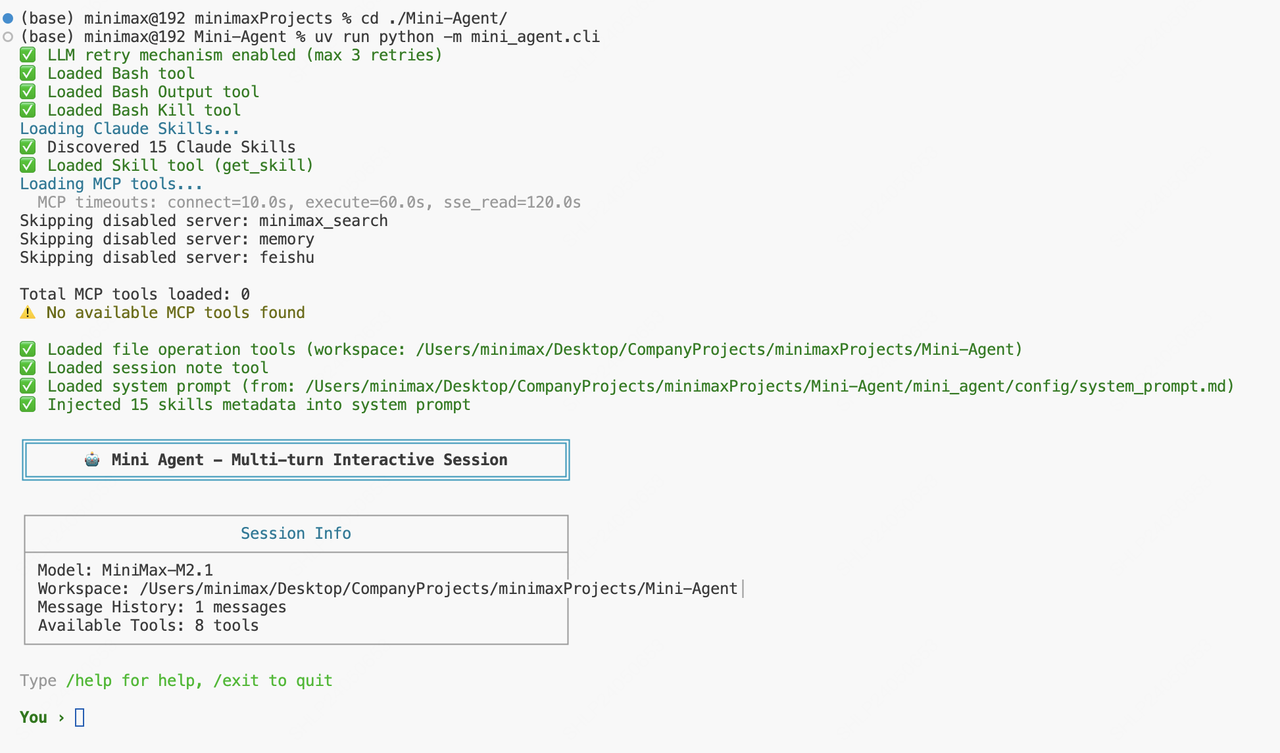
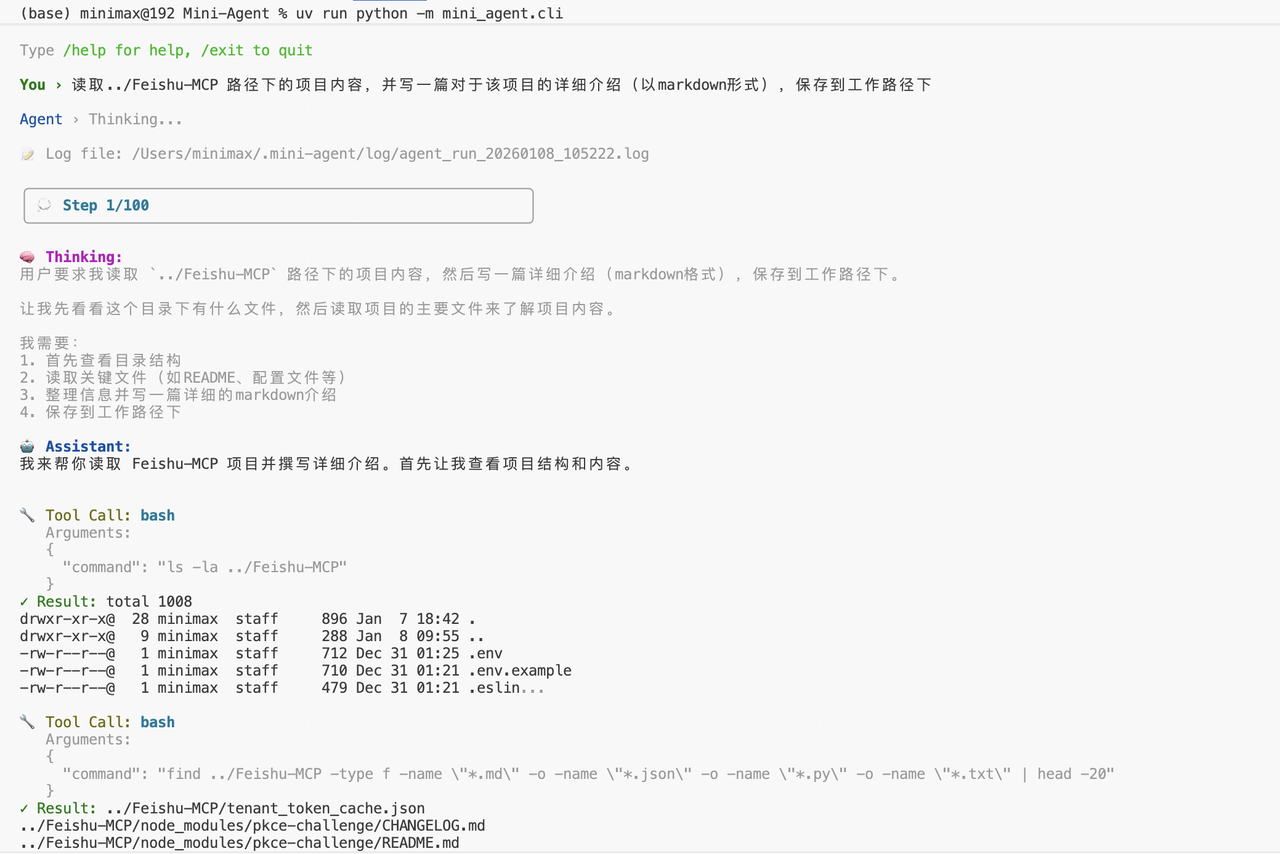
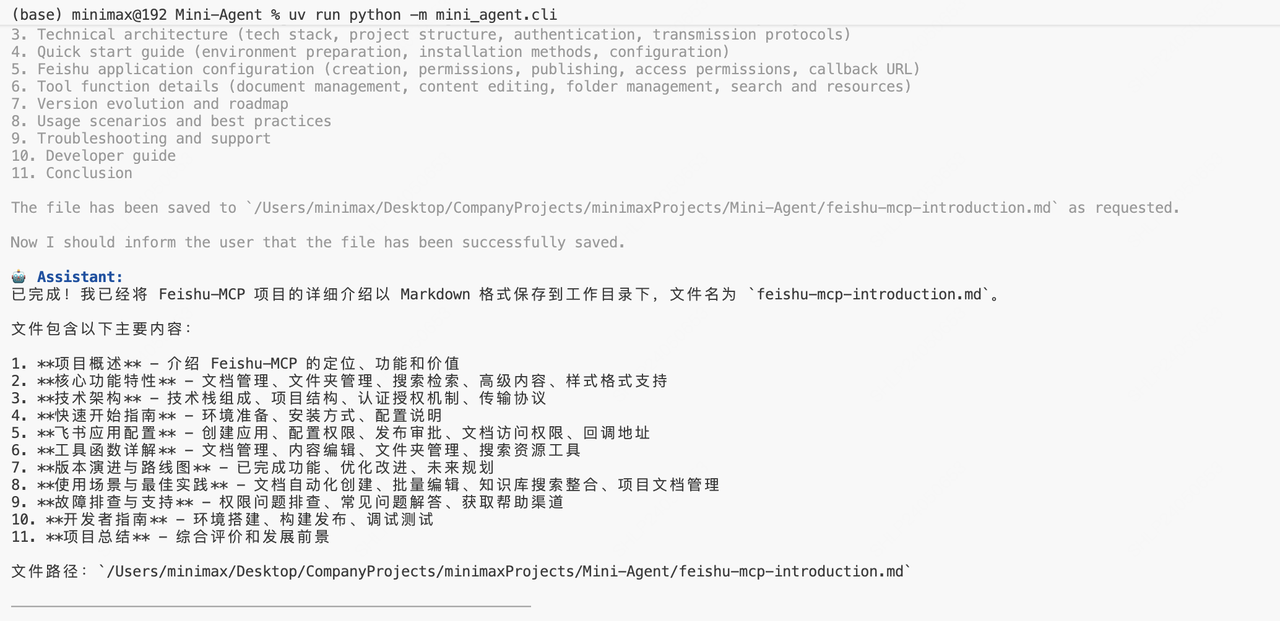
运行后,您将看到 Mini-Agent 的交互界面: Mini-Agent 启动界面 我们让它完成一项读取并解释 MCP 的任务: Mini-Agent 交互界面 Mini-Agent 成功完成任务: Mini-Agent 执行结果

总结

  • Agent 的本质是循环决策,包括感知(Perception)、思考(Thinking)、执行(Execution)、反馈(Feedback)四种类型的行为
  • Memory 即 Agent 的记忆能力,本质是上下文(Context)的管理,包括对上下文的压缩、存储、检索等
  • Tool 是 Agent 与外部系统交互、扩展能力的基础接口;而业界后续提出的 MCP、Claude Skills 等能力,可以看作是对 Tool 的进一步抽象

相关资源