> ## Documentation Index
> Fetch the complete documentation index at: https://platform.minimaxi.com/docs/llms.txt
> Use this file to discover all available pages before exploring further.

# Hermes Agent ☤

> 在 Hermes Agent 中使用最新的 MiniMax M 系列模型进行自主 AI 编程。

<div style={{background:"#fffbeb",borderLeft:"4px solid #d97706",padding:"12px 16px",borderRadius:"6px",margin:"16px 0"}}>[**Hermes Agent**](https://github.com/NousResearch/hermes-agent) 是 Nous Research 出品的开源自我进化 AI Agent 框架。</div>

## 前提条件

* 拥有具备 Token Plan 或积分权限的 MiniMax [Token Plan Key](https://platform.minimaxi.com/user-center/payment/token-plan)
* 一台可访问终端的电脑（macOS、Linux 或 Windows WSL2）

***

<img src="https://mintcdn.com/minimax-zh/o4s7dA9m1MEvBPUq/images/hermes-agent-banner.png?fit=max&auto=format&n=o4s7dA9m1MEvBPUq&q=85&s=8a80dd5e8753f03a41d80d8da5510f89" alt="Hermes Agent" style={{borderRadius: '8px', marginTop: '12px', maxWidth: '100%'}} width="1145" height="196" data-path="images/hermes-agent-banner.png" />

## 安装 Hermes Agent

[Hermes Agent](https://github.com/NousResearch/hermes-agent) 是由 [Nous Research](https://nousresearch.com) 开发的开源自主学习 AI 智能体。它具备跨会话持久记忆、内置自改进学习能力、40+ 集成工具以及多平台支持（CLI、Telegram、Discord、Slack、WhatsApp）。

在终端中运行一键安装命令：

```bash theme={null}
curl -fsSL https://raw.githubusercontent.com/NousResearch/hermes-agent/main/scripts/install.sh | bash
```

验证安装：

```bash theme={null}
hermes doctor
```

更多信息请参考 [Hermes Agent 文档](https://hermes-agent.nousresearch.com/docs/)。

## 配置 MiniMax Token Plan

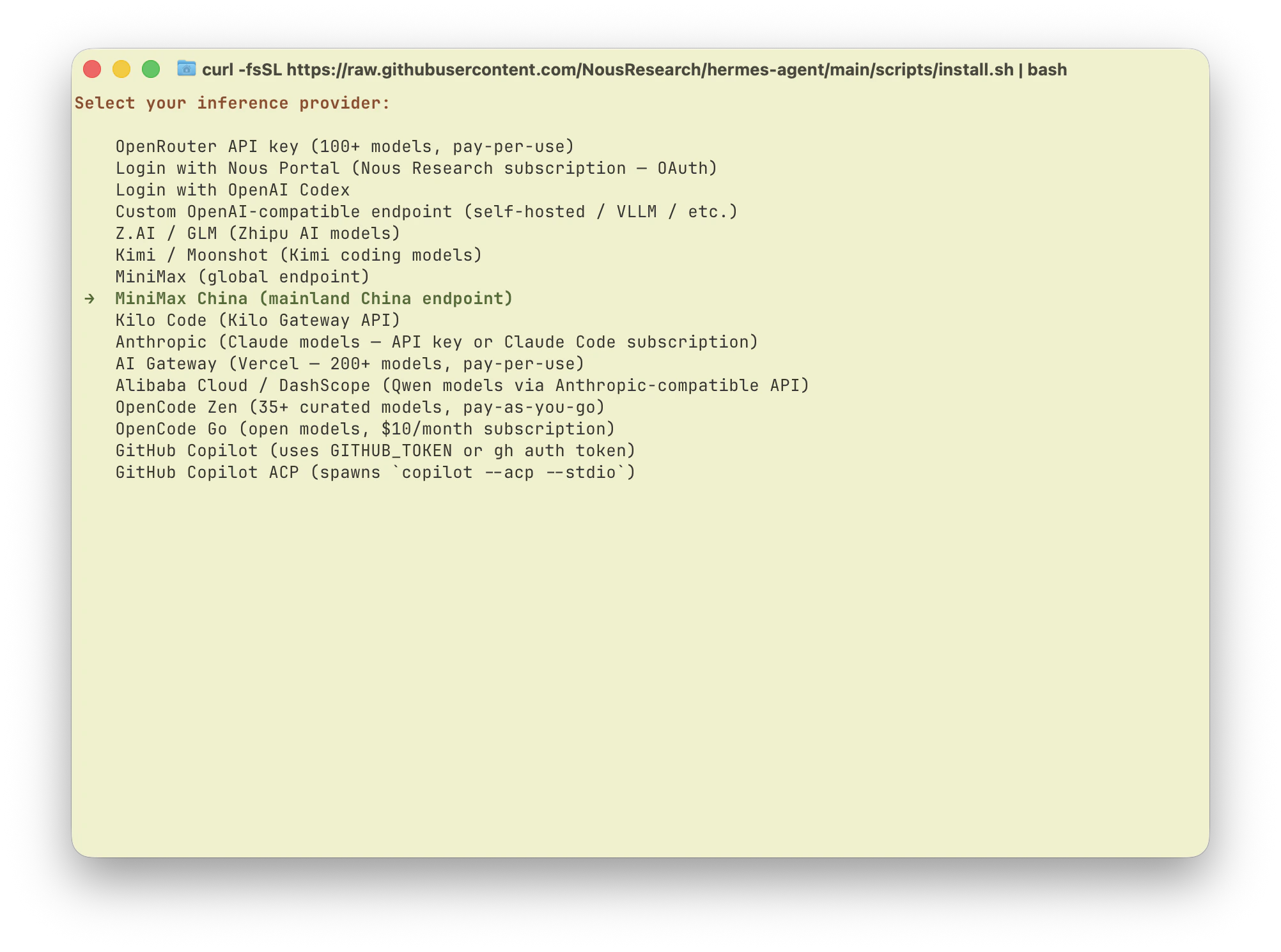
Hermes Agent 内置了对 MiniMax 的支持。运行模型选择器：

```bash theme={null}
hermes model
```

1. 从 provider 列表中选择 **"MiniMax China (mainland China endpoint)"**。
<img src="https://mintcdn.com/minimax-zh/o4s7dA9m1MEvBPUq/images/hermes-agent-provider-cn.png?fit=max&auto=format&n=o4s7dA9m1MEvBPUq&q=85&s=ebf3a03c099c60205c70c6609b3a4291" alt="选择 MiniMax China (mainland China endpoint)" style={{borderRadius: '8px', marginTop: '12px', maxWidth: '100%'}} width="2004" height="1490" data-path="images/hermes-agent-provider-cn.png" />

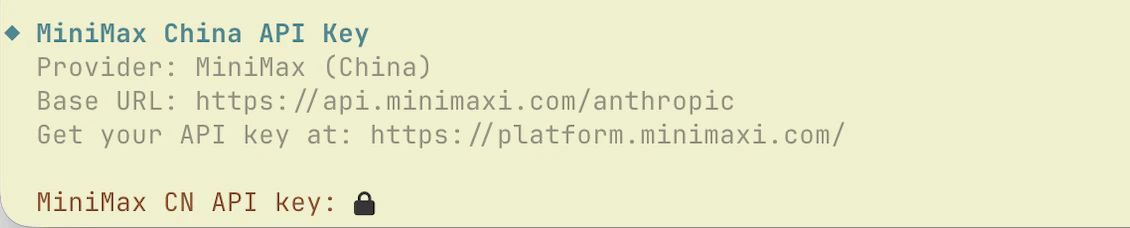
2. 输入从 [MiniMax Token Plan 页面](https://platform.minimaxi.com/user-center/payment/token-plan)获取的 **Token Plan Key**。

<img src="https://mintcdn.com/minimax-zh/o4s7dA9m1MEvBPUq/images/hermes-agent-apikey-cn.png?fit=max&auto=format&n=o4s7dA9m1MEvBPUq&q=85&s=14389c829e58ddc50d9d9668b2da7e3b" alt="输入 MiniMax CN API Key" style={{borderRadius: '8px', marginTop: '12px', maxWidth: '100%'}} width="1130" height="228" data-path="images/hermes-agent-apikey-cn.png" />

3. 选择 **MiniMax-M2.7** 作为模型。

<img src="https://mintcdn.com/minimax-zh/o4s7dA9m1MEvBPUq/images/hermes-agent-model-select.png?fit=max&auto=format&n=o4s7dA9m1MEvBPUq&q=85&s=cbaa348144509adae5b7ec7c240a9c72" alt="选择 MiniMax-M2.7" style={{borderRadius: '8px', marginTop: '12px', maxWidth: '100%'}} width="780" height="146" data-path="images/hermes-agent-model-select.png" />

<Info>
  还没有可用资源？请在 [Token Plan 页面](https://platform.minimaxi.com/user-center/payment/token-plan)查看您的 Token Plan Key，然后购买 Token Plan 订阅或积分，或使用 Team 分配给您的资源。Token Plan Key 与按量付费 API Key 不同。
</Info>

## 开始使用

运行 `hermes`，开始与由最新 MiniMax M 系列模型驱动的 Hermes Agent 对话。

<Tip>
  Hermes Agent 的持久记忆和自改进技能系统意味着使用越多效果越好——您的编程模式、项目上下文和偏好会自动跨会话记忆。
</Tip>